Reviving a Deprecated Samsung Chromebook 3 XE501C13 with Linux

Before I get started, Merry Christmas and Happy Holidays!
It's Christmas Day as I am writing this!
So my dad has a tiny 11.6" Samsung Chromebook 3 (model XE501C13), and despite him barely using it and only having 86 charge cycles total, he has to buy a new Chromebook.
Why, you may ask? Because Google is a money-making monster.
The Samsung Chromebook 3 has been officially deprecated since June 2022, but as of now, he can't even use the built-in Chrome browser to check his emails.
"Browser out of date" is all that reads on-screen.
I knew that the laptop could likely be saved by simply installing Linux, so I gave it a shot.
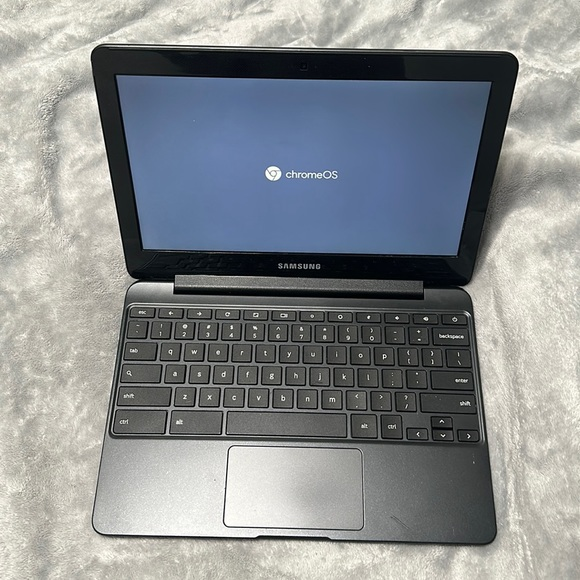
By the way, here's the specs list of the laptop:
- Intel Celeron N3060 2-core 1.6GHz base, up to 2.48GHz
- 4GB LPDDR3
- 32GB eMMC storage
So, the device is pretty dog in terms of specs, but I proceeded on anyway.
First, I had to get an actual UEFI bios on the thing, so I used the MrChromeBox Firmware Utility Script, and it worked pretty much perfectly.
There wasn't full documentation on my exact model, but for other Samsung Chromebook 3 owners, there was a write-protected (WP) screw that needed to be removed from the board. After testing some commands (from AI help) to see the status of the FMP (Firmware Write Protect), I figured out I didn't even need to disassemble the laptop on my specific model (XE501C13) for one reason or another, which was a relief to see.
I enabled developer mode on the laptop, navigated to the terminal, typed this:
cd; curl -LOf https://mrchromebox.tech/firmware-util.sh && sudo bash firmware-util.sh
And pressed [ENTER]
I followed the rest of the instructions on screen, as well as double-checked what I was doing on the documentation.
When it was completed, I had a coreboot UEFI BIOS on the previously deprecated device, and I realized it was all coming together.
Which Distro Did I Pick?
Now, I had a few options to choose from in terms of Linux Distros.
It needs to be:
- Fast and lightweight.
- Easy to use.
- Similar (or at least somewhat similar) to familiar desktop OSes, e.g., Windows.
No, I'm not installing Arch. This is a laptop for my dad, remember?
I ended up going with Linux Mint XFCE Edition.
I went with it because it's definitely very easy to use, lightweight (because of XFCE DE), and has an excellent user-friendly experience. You can get away with never having to open the terminal if you don't want to.
P.S.: I would totally install Arch on it if the laptop were mine >:)
So I installed the ISO onto my 16GB USB drive, and it all works pretty okay.
Some Issues (So Far)
The performance of the operating system is pretty decent overall.
Except when using the Chrome browser.
My dad uses the Chrome browser and wouldn't want to switch to Firefox like a real Linux user would.
Thank you to all the Google Chrome developers for making a browser that doesn't efficiently allocate memory for a nearly decade-old entry-level spec laptop with 4GB of LPDDR3 RAM.
In all seriousness, it works well enough. It is fine for navigating most sites and simply browsing the web. It runs into some stuttering with YouTube, but it's to be expected with a CPU of this tier.
To sort of workaround the bad performance of the laptop, I have a Windows 11 VM hosted on my server that can be RDP'd into at any time if needed, I told my dad.
Sound issue (fixed, I think)
The audio would sometimes freeze, and just sort of emit whatever sound it was playing for the next 10 seconds uninterrupted, basically sounding like a long beep.
Turns out, it's a common audio driver issue, and I think I've got it fixed with some Google Gemini help, but I'll have to do more testing.
I'll Give Myself Some Credit
Overall, I can't say it's too janky.
I turned what was essentially e-waste into a functioning laptop again.
I am super curious how well it would run Arch, though. I do really like the form factor of it, and I don't mind that it doesn't have a [SUPER] key.
The battery life on it is pretty insane as well, I think it's around 10-12 hours per full charge.
Having it as a schoolwork device and portable SSH box would be pretty cool.
Anyways, Merry Christmas and Happy Holidays! Peace.